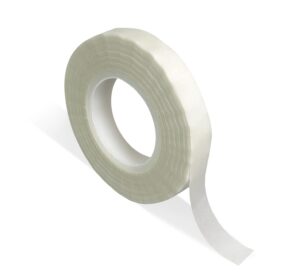
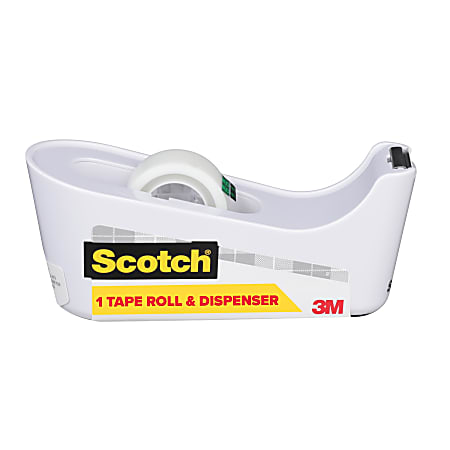
To open a Scotch C40 tape dispenser, lift its top cover or tape holder gently, then remove the empty roll or refill hub. The Scotch C40 is built for quick, clean tape use, but its compact design can make the opening point hard to spot.
This guide explains how to open Scotch tape dispenser C40 models safely, load a new roll, fix a stuck cover, and avoid damage to the cutting edge or plastic case.
What You Need Before Opening a Scotch C40
Opening a Scotch C40 tape dispenser should not require tools. In most cases, you only need the dispenser, a new roll of tape, and a clear work surface.
Before you begin, check these points:
• Make sure the dispenser is empty or nearly empty.
• Place it on a flat table so it does not slide.
• Keep your fingers away from the serrated cutting edge.
• Check whether the tape holder has a hinged cover, removable top, or center hub.
• Use a refill that matches the dispenser’s width and core size.
The C40 name can refer to slightly different color or retail versions. Most use a simple top-opening design, but the exact hinge or holder may look different. If the top does not lift with light pressure, stop and look for a small release point rather than forcing it.
The 10 Best Scotch Tape for Every Job: Which One Do You Actually Need?
How to Open Scotch Tape Dispenser C40
Follow these steps to open Scotch tape dispenser C40 without cracking the plastic or bending the tape cutter.
- Set the dispenser on a stable surface. Hold the base with one hand to keep it from moving.
- Look at the upper section around the tape roll. Find the seam between the top cover and the lower body.
- Place your thumb near the back edge of the top cover. This is often where the cover begins to lift.
- Raise the cover slowly. Some C40 versions have a hinged lid, while others allow the tape holder or spindle to lift out.
- If the cover does not move, inspect both sides for a small locking tab. Press the tab inward while lifting the cover.
- Remove the old roll by sliding it off the center holder. If the roll is stuck, turn it gently instead of pulling hard.
- Check the inside for loose tape, dust, or a broken plastic core.
The key is to use steady, even pressure. When I handle compact desktop dispensers, the most common mistake is lifting one corner too hard. That twists the lid and can stress the hinge.
How to Load a New Tape Roll
Once you open Scotch tape dispenser C40, loading the replacement roll is simple. The tape must unwind from the correct side so the adhesive strip reaches the cutting edge smoothly.
- Hold the new roll so the tape’s loose end faces the front of the dispenser.
- Slide the roll onto the center hub or spindle.
- Pull about 3 to 5 inches of tape toward the cutting edge.
- Guide the tape over the support path, if your model has one.
- Close the top cover or press the tape holder back into place.
- Pull the tape gently and cut it across the serrated edge.
The adhesive side should normally face downward as the tape travels toward the cutter. If the tape curls backward, flips over, or sticks inside the housing, remove it and turn the roll around.
Do not overfill the dispenser. A roll that is too wide can rub against the case and make the tape difficult to pull. A correct refill should rotate freely without wobbling.
How to Open a Stuck Scotch C40
A stuck Scotch C40 cover is often caused by adhesive buildup, a tape fragment, or pressure from an incorrectly fitted roll. Avoid using a knife, screwdriver, or other sharp object to pry it open.
Try this safe method:
• Hold the bottom of the dispenser firmly.
• Press lightly near the cover’s latch or seam.
• Lift the cover from both sides at the same time.
• Pull away any visible tape from the hinge area.
• Rotate the tape roll backward to release tension.
• Wipe the seam with a dry cotton swab.
If the cover still will not open, check for a hidden snap tab. Many plastic dispensers use a small molded clip that releases when pressed inward. Use a fingernail or a blunt plastic card, not a metal tool.
Never force the cutting edge. The cutter is usually fixed to the body, and bending it may make the dispenser unsafe or prevent clean cuts.
Common Problems After Opening the Dispenser
Knowing how to open Scotch tape dispenser C40 is only part of the job. A few loading errors can cause poor tape flow or repeated jams.
The tape will not pull
The roll may be facing the wrong direction. Open the dispenser, turn the roll around, and feed the loose end toward the cutter.
The tape keeps tearing
The tape may be caught under the wrong guide. It may also be too narrow or too thick for the dispenser. Refit the roll and make sure the tape meets the serrated edge at a straight angle.
The tape rolls backward
This usually means the loose end was not pulled far enough through the front opening. Pull a short length forward before closing the top.
The cover will not close
The roll may not be seated fully on the hub. Remove it, check for a crushed cardboard core, and reinstall it evenly.
The dispenser slides across the desk
The non-slip feet may be dusty or worn. Clean the bottom with a slightly damp cloth and allow it to dry before use.
In office testing, a misaligned roll is often mistaken for a broken dispenser. Checking the roll position first can save time and prevent unnecessary pressure on the cover.
Cleaning and Maintaining a Scotch C40
Regular cleaning helps the dispenser open and close smoothly. Tape adhesive can collect around the spindle, lid seam, and cutting edge.
Use these maintenance steps:
• Remove the tape roll before cleaning.
• Wipe the housing with a soft, dry cloth.
• Use a small amount of isopropyl alcohol on a cloth for sticky residue.
• Keep liquid away from hinges and internal openings.
• Let the surface dry fully before installing a new roll.
• Do not file, sharpen, or bend the cutting teeth.
Use only a small amount of cleaning liquid. Excess moisture can weaken paper tape cores and may affect plastic parts over time. If the hinge is cracked or the cutter is loose, replacement is safer than repair.
The manufacturer’s care guidance should take priority if your particular C40 version includes printed instructions or a product insert.
Safety Tips for Opening Scotch Tape Dispenser C40
A Scotch C40 is a small office tool, but its cutting edge can still cause a painful scratch. Children should use it only with adult supervision.
Keep these safety rules in mind:
• Hold the base, not the cutting teeth.
• Open the cover away from your face.
• Do not pry the body with a blade.
• Do not touch the serrated edge while pulling tape.
• Replace a dispenser with cracked plastic.
• Store the dispenser with the tape end secured.
The cutting teeth are designed to tear tape, not cut skin. Use a slow, controlled motion and keep your fingers behind the tape path.
Choosing the Right Refill
The correct refill makes it easier to open Scotch tape dispenser C40 and keeps the mechanism working well. Look for a roll that matches the original tape width and inner core.
Before buying a refill, compare:
• Tape width
• Roll diameter
• Core diameter
• Tape thickness
• Intended use
Standard transparent office tape is usually the easiest choice for a desktop dispenser. Heavy shipping tape, masking tape, duct tape, and very thick specialty tape may not fit the C40 opening.
A refill that looks close in size may still bind inside the housing. When possible, compare the new roll with the old one before opening the package.
When to Replace the Dispenser
Most C40 dispensers can be used for years if the case, hinge, and cutter remain intact. However, replacement is sensible when the main parts no longer work safely.
Consider a new dispenser if:
• The top cover will not stay closed.
• The hinge is split.
• The cutting edge is loose.
• The tape repeatedly jams with the correct refill.
• The base rocks or slides badly.
• Plastic pieces break off during opening.
A damaged cutter can create uneven tape tears and sharp exposed edges. Since desktop dispensers are relatively inexpensive, replacing a badly damaged unit is often safer than attempting a permanent repair.
Frequently Asked Questions About How to Open Scotch Tape Dispenser C40
How do you open a Scotch C40 tape dispenser?
Hold the base firmly and lift the top cover or tape holder near the rear seam. If it does not lift, press the small side latch while raising the cover gently.
Does the Scotch C40 require a screwdriver to open?
No, a working Scotch C40 should open by hand. Do not use a screwdriver because it can crack the plastic, damage the hinge, or slip toward your fingers.
How do you remove an empty roll from a Scotch C40?
Open the top cover and slide the empty roll off the center hub or spindle. If it sticks, rotate it gently while pulling instead of forcing it.
Which way should tape face in a Scotch C40 dispenser?
The loose tape end should move toward the front cutting edge, with the adhesive side positioned correctly for your tape path. If the tape curls or sticks inside, remove the roll and reverse its direction.
Why will my Scotch C40 not open?
A tape fragment, adhesive residue, misaligned roll, or locking tab may be holding the cover shut. Remove visible debris and press both sides of the cover evenly while checking for a release tab.
Can you clean a Scotch C40 with water?
Use a nearly dry cloth for general cleaning. For sticky residue, apply a small amount of isopropyl alcohol to the cloth, and keep liquid away from the hinge and internal parts.
Can a Scotch C40 use any tape refill?
No, the refill must fit the dispenser’s width, core, and roll capacity. Standard office tape is usually suitable, while thick or oversized tape may jam the housing.
Conclusion
Opening a Scotch C40 tape dispenser is usually a simple matter of lifting the top cover or releasing the tape holder. Work slowly, keep your fingers away from the serrated edge, and never force the plastic with a sharp tool.
After opening Scotch tape dispenser C40, install the roll with the loose end facing the cutter, test the tape path, and clean away adhesive when needed. If the hinge or cutter is damaged, replacing the dispenser is the safest choice. Try these steps with your C40, and share your experience or questions in the comments.